

Redlining an agreement
Turn review findings into concrete, tracked changes — with rationale you can stand behind.
Redlining is the natural next move after a review: instead of just naming the problems, you ask instaSpace to propose the actual edits — in tracked changes, with the reasoning to justify each one. In a few minutes you'll go from "these clauses are a problem" to "here's the wording I'd send back, and why."
By the end you'll have a marked-up agreement — proposed changes you can review, refine, and take into a negotiation.
You'll need a contract open in the assistant — a Word (.docx) file if you want
to take the redline back out as tracked changes. If you haven't got one yet, start with
Reviewing a contract.
Ask for changes, not just comments
Attach the Word file — say Mutual Non-Disclosure Agreement.docx from your
vault — or carry straight on in the same conversation as
your review. Then tell instaSpace what to change and from whose side. The more you anchor
it (your position, your risk tolerance, the clauses you care about), the more useful the
redline:
Acting for the receiving party, redline this NDA. Propose changes to the confidentiality definition and any uncapped liability — for each, show the revised wording and a one-line rationale I can send to the counterparty.
A PDF works for reading and reviewing, but a redline you want to hand back should
start as .docx — that's what lets the proposed edits leave as real Word tracked
changes rather than as text you retype.
Read the tracked changes
instaSpace marks up the document itself: additions and deletions shown inline, just like track changes, with a navigator listing every change so nothing slips past you. Each edit carries the reasoning behind it.
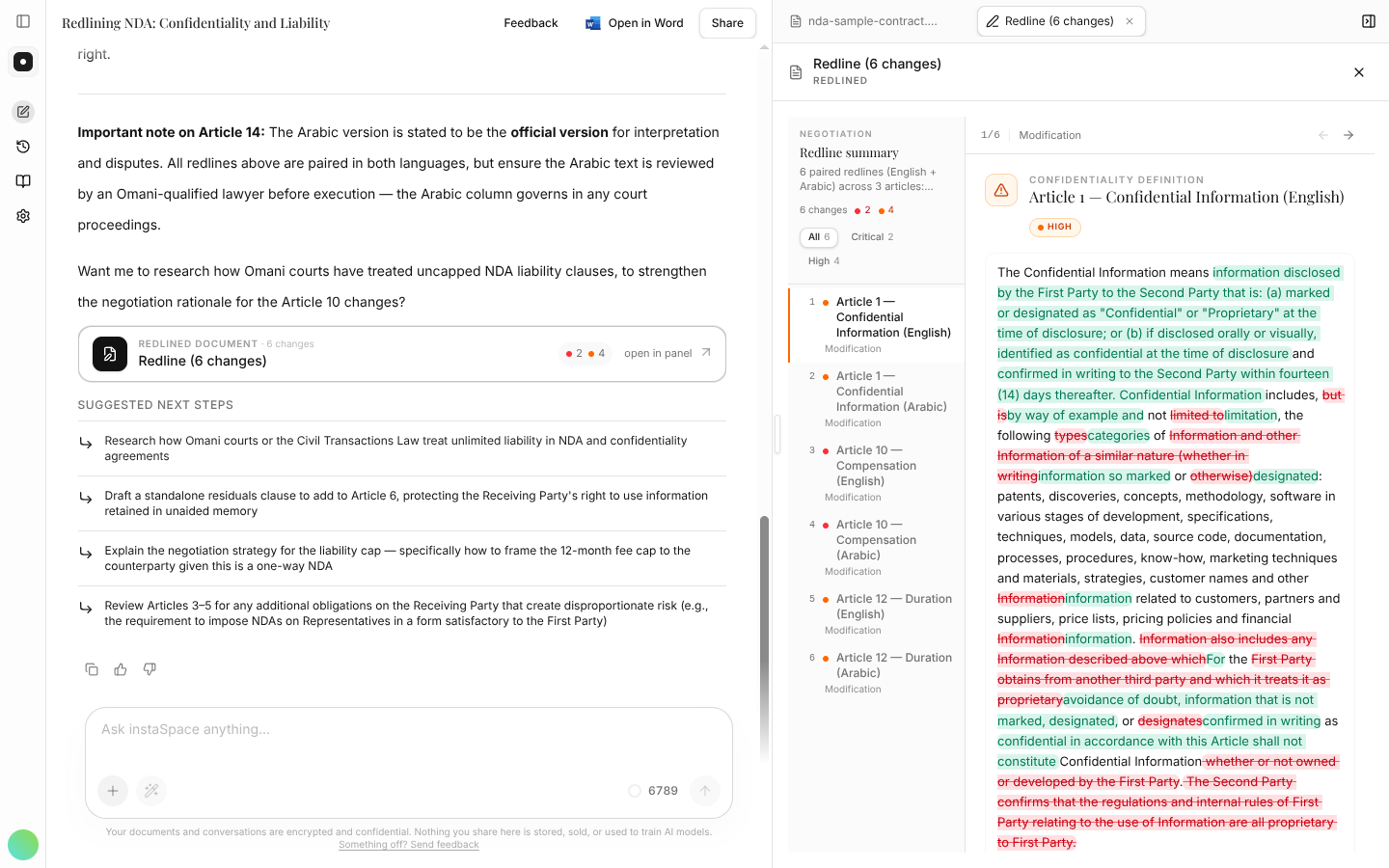
Work through the changes one at a time. This is your draft, not the counterparty's, so weigh each edit before you accept it, and reword anything that doesn't sound like you.
Take it back out as Word tracked changes
The toolbar above the document offers a Redlined copy — every proposed change written
into the .docx as genuine Word tracked changes, so the counterparty opens it and sees
exactly what they'd see from any other firm, with Accept and Reject where they expect them.
Downloading a redlined copy is a paid-plan feature. On the Free plan you can read the redline in the app, but not export it.
Soften, harden, or add a fallback
A redline is a conversation. Push back on instaSpace the way you would a colleague:
Give me a more moderate fallback position for the liability cap.
Asking for a primary and a fallback in one go saves a round-trip when the counterparty inevitably pushes back.
Take it to the table
When you're happy, export the redline to Word to finish in your usual track-changes workflow — or keep working in the document itself with instaSpace for Word. If it's a redline you'll run often, save the prompt as a playbook so your standard positions apply in one click next time.
- A redline with no stated position is just a rewrite — always say which side you're on and how hard to push.
- Ask for the rationale with every change; it's what you'll paste into the covering email.