

Plans, credits & billing
What a credit is, what each plan includes, and where the billing controls live.
instaSpace bills for AI work in credits. Your plan sets how many you get each month and what else the workspace can do — seats, e-signatures, integrations.
By the end you'll know what spends a credit, the difference between monthly and top-up credits, and how changing plan works.
Where to look: Settings → Billing for your plan, credits, seats and invoices.
What spends a credit
Every review, draft and research run spends credits. Longer documents and longer answers cost more — there's no flat per-task price, because a two-page NDA and a 90-page acquisition agreement are not the same work.
The meter beside the composer shows what's left before you start something long. Opening it breaks the balance down.
Three kinds of credit
| Kind | Where it comes from | How it behaves |
|---|---|---|
| Free | A one-time grant on the Free plan | Does not renew. At zero, work pauses until you pick a plan — nothing you've made is lost. |
| Monthly | Your plan's allowance | Refills in full on your renewal date. It does not roll over — what's left is replaced, not added to. |
| Top-up | Bought any time, on Max only | Expires. Buying again extends everything you're holding to the new date. |
Top-ups are spent first, because they expire and the monthly allowance comes back anyway. You only start drawing on the monthly credits once the top-ups are gone.
The plans
The picker has two sides. Individual runs Free → Starter → Professional → Max; Teams runs Team Standard → Team Premium → Enterprise. Annual billing is cheaper than monthly on every paid plan.
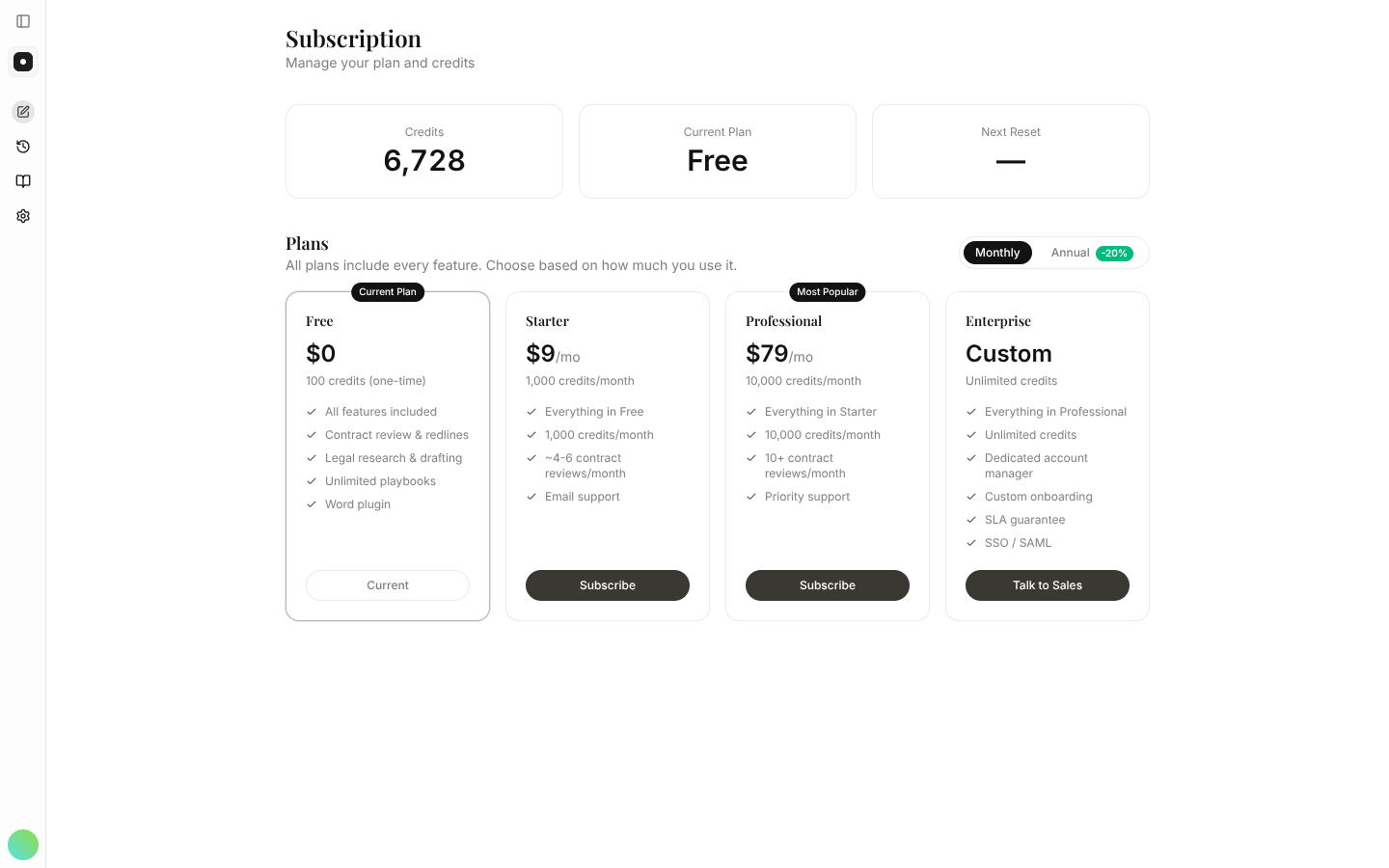
Two thresholds are worth knowing. Professional is where the Word plugin and all integrations unlock, and Max is the only plan that can buy top-up credits.
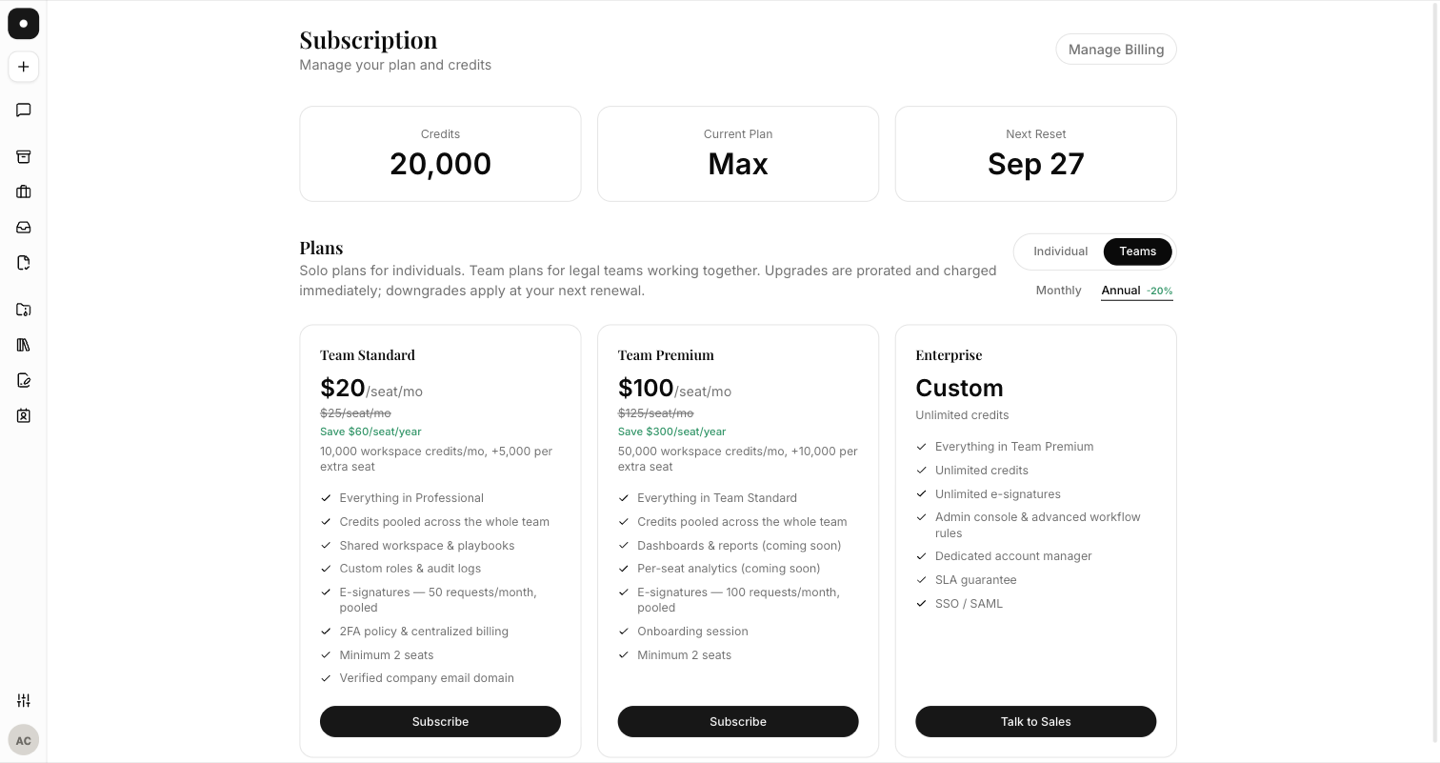
Team plans differ from individual ones in kind, not just size:
- Credits are pooled across the whole workspace — one balance everyone draws on, not an allowance each. Every extra seat raises the pool.
- They're priced per seat, need a minimum of two, and require a verified company email domain — personal addresses can't start one.
- E-signature quotas are pooled too.
Seats adjust with membership. Inviting someone adds a billed seat automatically (prorated), and Manage seats lets you buy seats ahead of the invites or release unused ones — never below your current member count.
Changing plan
- Upgrades start today, prorated and charged immediately.
- Downgrades are scheduled: you keep the plan you're on until the end of the current period, then move. Until then the page shows Scheduled change — your plan switches to X on DATE, and you can cancel it.
- Switching monthly ↔ annual follows the same rule — to annual charges the difference now, to monthly starts at your next renewal.
Where the controls are
Settings → Billing holds the plan, the credit breakdown, seats, and Invoices & payment method — download receipts there, or open the billing portal to change the card.
Two cases where you won't see it:
- Members on a Team plan see Managed by workspace owner. Billing belongs to whoever owns the subscription.
- Enterprise workspaces have no self-serve billing page at all — the tab is hidden and the subscription page redirects away. Enterprise terms are contractual, so plans and credits are agreed with your account manager, not changed in the app.
Plan and seat changes are recorded in the audit log —
plan_changed, seats_updated, subscription_canceled and the rest.