

The assistant & threads
A tour of the main workspace — the chat, the document viewer, and how conversations are organized.
The assistant is where you spend most of your time. It's a chat interface with your documents alongside, and every conversation is saved as a thread you can return to.
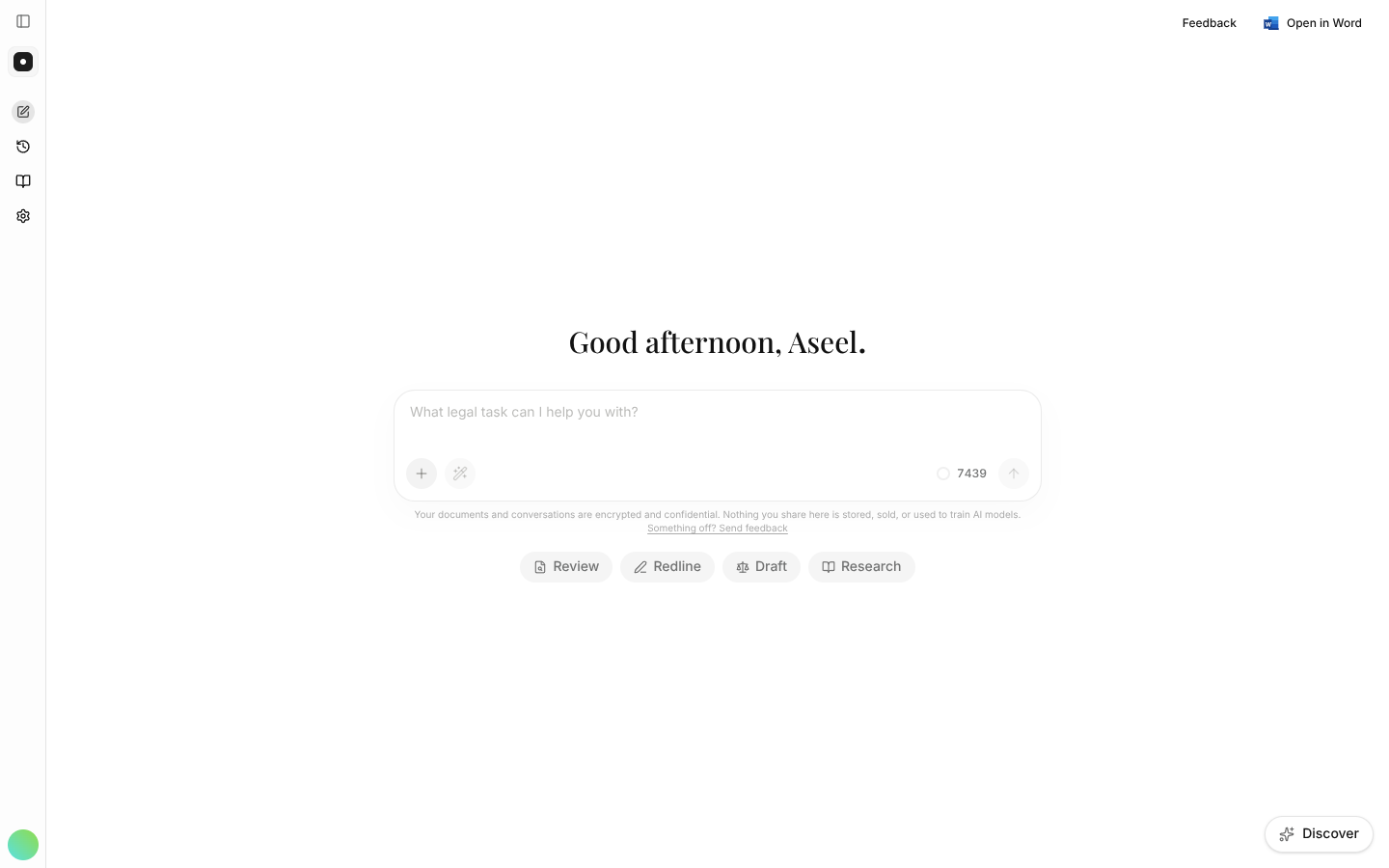
What's on the screen
- Prompt box — type a request in plain language. The + beside it holds everything that rides a message (see below), and your credit meter sits alongside.
- Review / Redline / Draft / Research — quick starting points for the four core jobs.
- Left rail — a Work zone holding Intake, Matters, Requests and Signatures, and a Library zone holding the vault, playbooks, templates and contacts — plus a new task, your history, the getting-started checklist, and settings.
- Document viewer — when a document is attached, it opens beside the chat so answers sit next to their source.
The + menu
The + beside the composer holds everything that rides a message, not just attachments:
| Item | What it does |
|---|---|
| Add a document | Upload from your device, or choose from the vault. |
| Add to matter | Files this conversation, and the documents it produces, into a matter. |
| Skills | Applies a skill to this conversation. |
| Memory | On a chat that hasn't started, unticking it gives you a temporary chat. |
The Word add-in has the same menu and sends the assistant the same context.
Attaching documents and images
Attachments can be PDF, Word, or PNG/JPEG images — a scanned page, a photo of a signed clause, a screenshot. The assistant reads what's written in an image alongside your other documents, so a handwritten margin note is something you can ask about.
If a file is refused, the message says why: an unsupported type, a file over the size limit, or too many files on one message.
The credit meter
The meter beside the composer shows what you've spent and what's left on your plan, so you can see where you stand before starting a long piece of work. Opening it shows credits used, credits remaining and your plan allocation — plus any top-up credits, which are spent before your monthly allowance and carry an expiry date.
See Billing & credits for what a credit is and how plans differ.
Threads
Each conversation is its own thread. Start a new task for each distinct piece of work to keep context clean — then find everything later in History.
A thread builds on itself: research a point, review a contract, then ask the assistant to draft an agreement using those earlier findings. It carries the prior work forward rather than just the last message — which is why a long, coherent thread often beats four short ones.
Sharing a thread sends a read-only view — useful for handing a review to a colleague. Filing it into a matter shares it with everyone on that matter instead, and brings its documents with it.