

Skills
Standing instructions the assistant applies automatically — your positions, your style, your sources.
A skill is a written instruction the assistant applies without being asked again. If you find yourself telling it the same thing at the start of every review — rank findings by risk, cite the clause number, never accept an uncapped indemnity — that belongs in a skill.
By the end you'll know how to write a skill that fires reliably, the difference between workspace and personal skills, and how to apply one to a single chat.
Where to look: Settings → Skills (workspace) and Settings → My skills (yours).
Two layers that stack
| Page | Applies to | Who can edit |
|---|---|---|
| Settings → Skills | Everyone in the workspace | Owners and managers |
| Settings → My skills | Only your messages | You |
They stack rather than compete: workspace skills apply to you too, and your personal ones are an extra layer on top.
Writing one that works
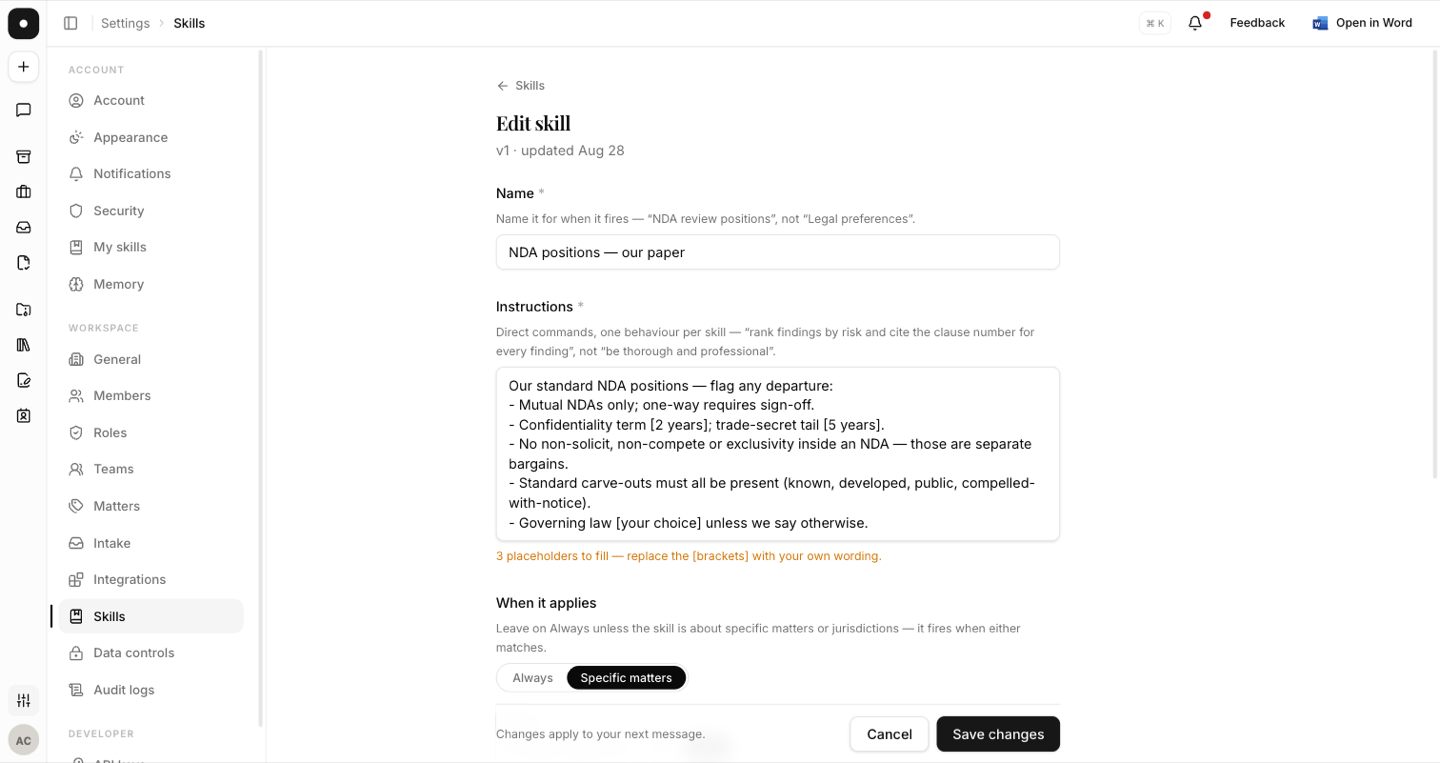
Two fields do the work — a name and the instructions.
Name it for when it fires, not for what it's about: "NDA review positions" tells you when you'll see it; "Legal preferences" doesn't.
Write direct commands, one behaviour per skill. The guidance in the product is worth quoting:
"rank findings by risk and cite the clause number for every finding", not "be thorough and professional"
If you start from an example in the gallery, replace every [bracketed] placeholder with
your own wording. The assistant reads bracketed text exactly as written — the app warns
you before saving one, but it will save it if you insist.
When it applies
Always is the default, and right for most skills. The alternative, Specific matters, scopes a skill to matter types, jurisdictions, or both — it fires when either matches.
- Matters — picked from your workspace's matter types. If none are defined yet, define them first.
- Jurisdictions — typed freely: DIFC, England & Wales, New York, GCC. The assistant holds its knowledge per country and tells you how what you typed folds down. Anything it doesn't cover is saved but won't fire, and it says so rather than failing quietly.
Preferred sources
A skill can list URLs the assistant leans on. These are secondary references, never the law itself — useful for your own precedent bank or a regulator's guidance page, not a substitute for authority. Lines that aren't links are ignored, and the app tells you which.
Applying one to a single chat
You don't have to change a skill's scope to use it once. In the composer's + menu, Skills lists the workspace's skills and your own; ticking one applies it to this conversation whatever its trigger says.
A chip above the composer names it for as long as it applies, and one click removes it. The answer's Behind this answer panel then says "you chose it" rather than inventing a trigger.
Pinning is additive on purpose: it can never switch off a workspace skill that fires on its own. New skill… in that menu opens the editor over the chat instead of navigating away.
Housekeeping
Skills are versioned — the list shows v3 · updated 12 September — and can be paused rather than deleted when you want to stop one temporarily. Deleting removes its version history with it. Any change applies from your next message.