

Chat visibility
Decide who can see members' chat threads — and who you delegate that oversight to.
A workspace has to answer a question most tools duck: can colleagues see each other's conversations with the AI? There's no universally right answer — a two-partner firm and a regulated in-house team want opposite things — so it's a setting the owner makes deliberately.
By the end you'll have chosen a visibility policy and know who it applies to.
This is for the workspace owner, under Settings → General.
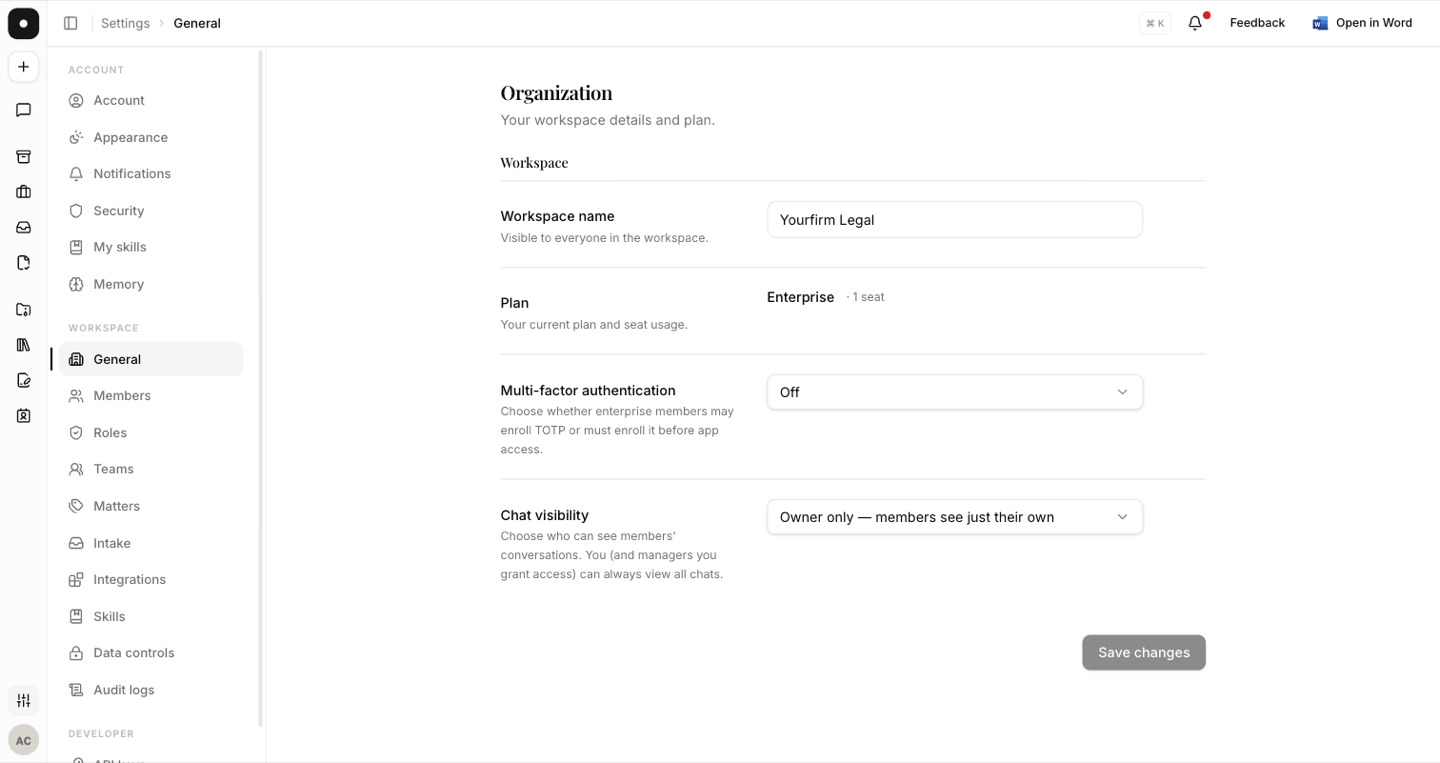
The three policies
| Policy | Who sees what |
|---|---|
| Open | Every member can see every member's chats. |
| Owner only | Members see only their own. The owner sees all. |
| Private | Members see only their own, plus chats explicitly shared with them. |
The owner always retains oversight — that's fixed. What the setting controls is how far it extends beyond them.
Delegating oversight
To let managers see others' chats too, grant the Chats → View all permission in Roles. This is worth doing consciously rather than as part of a general "managers can do more" sweep: it's the one permission that lets one colleague read another's working notes.
Where it shows up
Anyone allowed to browse others' chats gets a Mine / Workspace toggle on the History page. The sidebar's recent list always stays personal, so the day-to-day view never becomes someone else's work.
Shared chat links are organization-only — opening one requires being an authenticated member of that chat's workspace. A link that leaks outside the firm doesn't grant access.
Tell people which policy you've chosen. Oversight nobody knows about reads as surveillance when it's discovered; oversight that was announced reads as governance.