

Memory
What the assistant remembers about you across chats — where it goes, and how to change or erase it.
Memory is what the assistant carries between your chats, so a new conversation doesn't start from nothing. It keeps notes on your preferences and what you work on; you keep the final say over all of it.
By the end you'll know what gets remembered, how to add and remove entries, and the two switches that turn it off.
Where to look: Settings → Memory.
Three lists
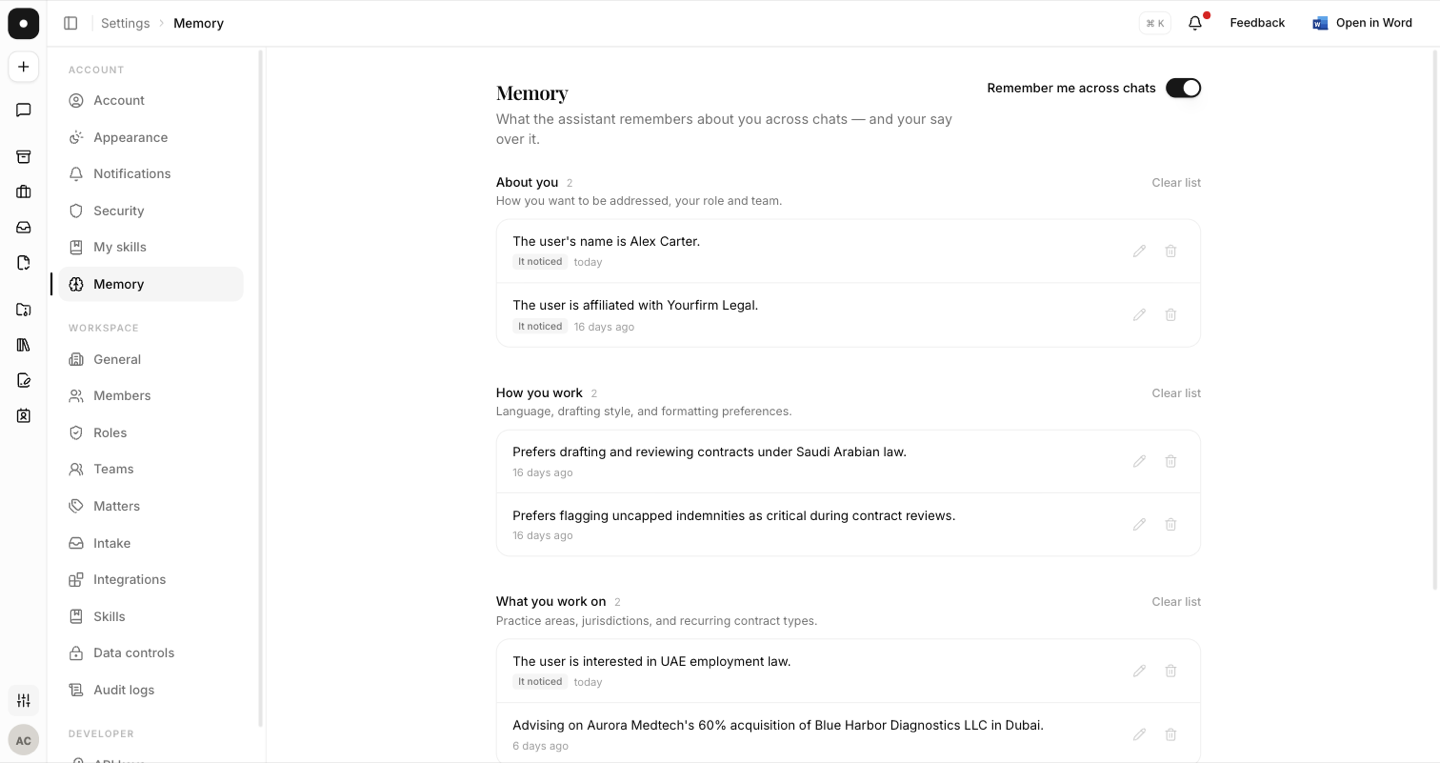
Memory is organised into three, and nothing else:
| List | What it holds |
|---|---|
| About you | How you want to be addressed, your role and team. |
| How you work | Language, drafting style, and formatting preferences. |
| What you work on | Practice areas, jurisdictions, and recurring contract types. |
Each entry shows where it came from. An entry the assistant worked out for itself is marked It noticed.
Adding something deliberately
Say "remember…" in any chat — "remember that I act for the landlord on all the Muscat leases" — and the assistant confirms with Saved to your memory. That's the whole mechanism; there's no separate form to fill in.
Changing your mind
Every entry can be edited or deleted individually. A whole list can be cleared with Clear list, and Clear all memory erases everything across every chat.
Clearing can't be undone. Clearing one list leaves the other two alone; clearing everything leaves new notes to build up again as you keep chatting.
Knowing when it was used
An answer that drew on memory says so: a Personalised · memory line under the reply, and an explainer reading "This answer drew on what the assistant remembers about you." The panel names which of the three lists it drew on.
The two switches
Memory can be off for two different reasons, and the page distinguishes them:
- Yours — Remember me across chats, on your own Settings → Memory page. Off, the assistant stops taking new notes and stops using existing ones. Nothing is deleted.
- Your workspace's — an owner can turn personal memory off for everyone under Settings → Data controls. When they have, your Memory page says so, and your own preference won't take effect until it's turned back on.
Either way, changes apply from your next message.
For a single question that shouldn't touch memory at all, use a temporary chat instead of switching memory off and back on.