

The getting-started checklist
Seven steps in the sidebar that tick themselves off as you work.
Once setup is done, a small card settles at the bottom of the left rail: Getting
started, with a count — 5/7 — and a segmented bar beneath it. It is the shortest
honest tour of the product, and you finish it by using instaSpace rather than by reading
about it.
By the end you'll know what the seven steps are, why your own list may be shorter, and how the card decides a step is done.
Where to look: the bottom of the left rail, with the sidebar expanded.
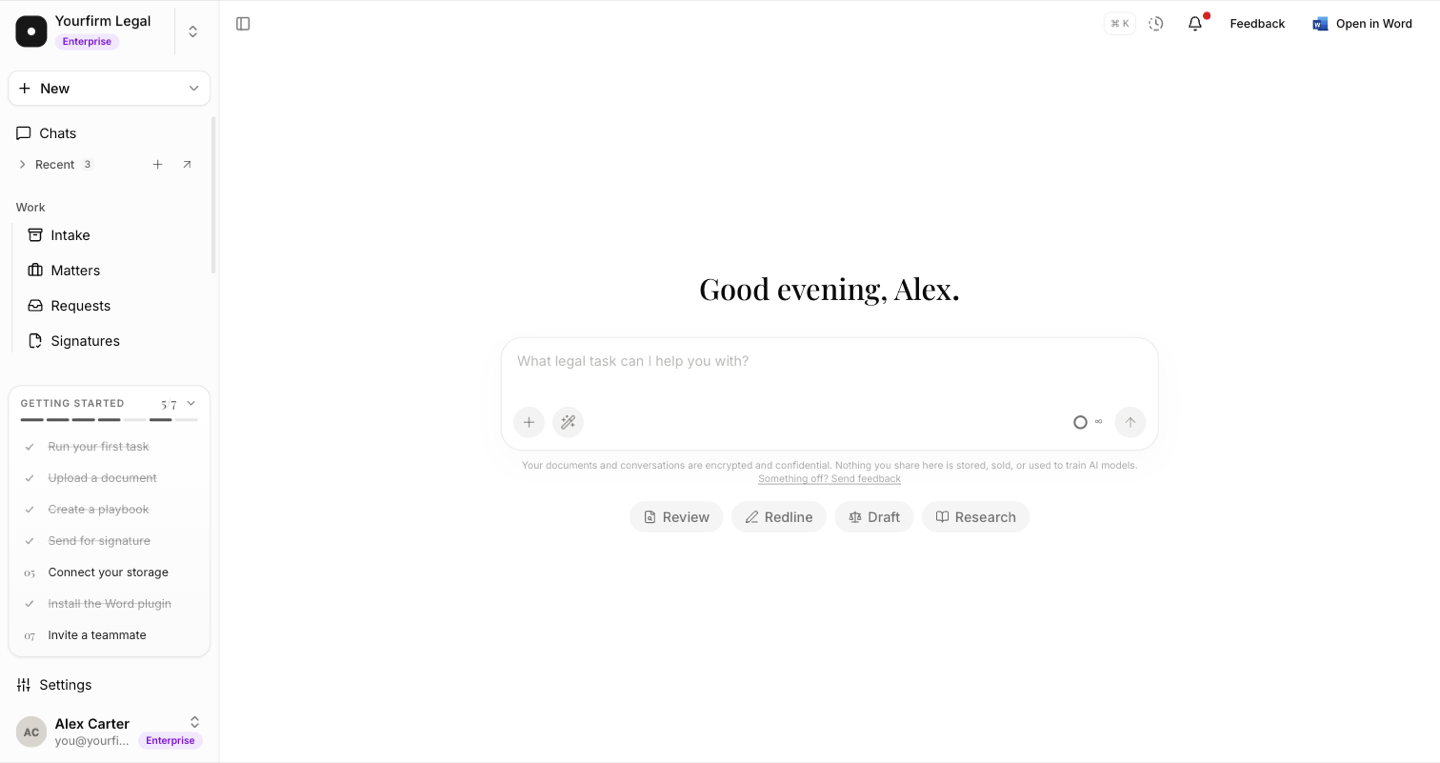
The seven steps
| Step | Where it takes you |
|---|---|
| Run your first task | A new chat in the assistant. |
| Upload a document | The vault. |
| Create a playbook | Playbooks. |
| Send for signature | Templates. |
| Connect your storage | Settings → Integrations — see cloud storage. |
| Install the Word plugin | Hands off to Word itself — see the Word add-in. |
| Invite a teammate | Settings → Members — see inviting your team. |
Clicking a row goes there. The two settings steps open settings in place rather than navigating away, and the Word step passes you to Word rather than to a page.
It ticks itself
Nothing here is a "mark as done" button. Every step is worked out from your workspace's actual data each time the card loads — a thread that exists, a document in the vault, a signature request that went out. Two consequences worth knowing:
- If you did something before you ever noticed the card, it is already ticked the first time you look.
- A step cannot be ticked by clicking it. Opening Playbooks and leaving again doesn't count; creating a playbook does.
Collapse it, but you can't dismiss it
Clicking the header collapses the card to a single line — which still tells you what to do next:
Next — Connect your storage →
There is no dismiss button. The card earns its place by disappearing on its own once every step you can actually finish is done.
Your list may be shorter than seven
The card only offers what you can finish, which is why two people in the same workspace can see different lists.
- Your role. A step your role can't perform is removed entirely — not greyed out, gone. The default Member role can read playbooks but not create them, so Create a playbook never appears for a member. Showing it would be a dead end: the page would refuse them anyway.
- Your plan. A step your plan doesn't include stays visible but locked — muted, with a padlock, linking to the upgrade page — so you can see the shape of the product rather than a three-item stub. Locked steps don't count toward the total, so the denominator is the number of steps you can reach.
The count is a good five-second read on how much of instaSpace a workspace is actually
using. A team sitting at 2/7 a month in is usually a team that never found the vault.