

Auto-open rules
Let clean, member-sent work of a chosen type open its own matter — with guards you write in advance.
Most intake should be reviewed. Some of it is so routine that review adds nothing but delay. Rules let you name that second category precisely, in advance, and nothing else.
By the end you'll know what a rule can and cannot do, what stops one from firing, and how to reverse a matter a rule opened.
This is for owners and managers, under Settings → Intake → Rules.
One ledger, two lanes
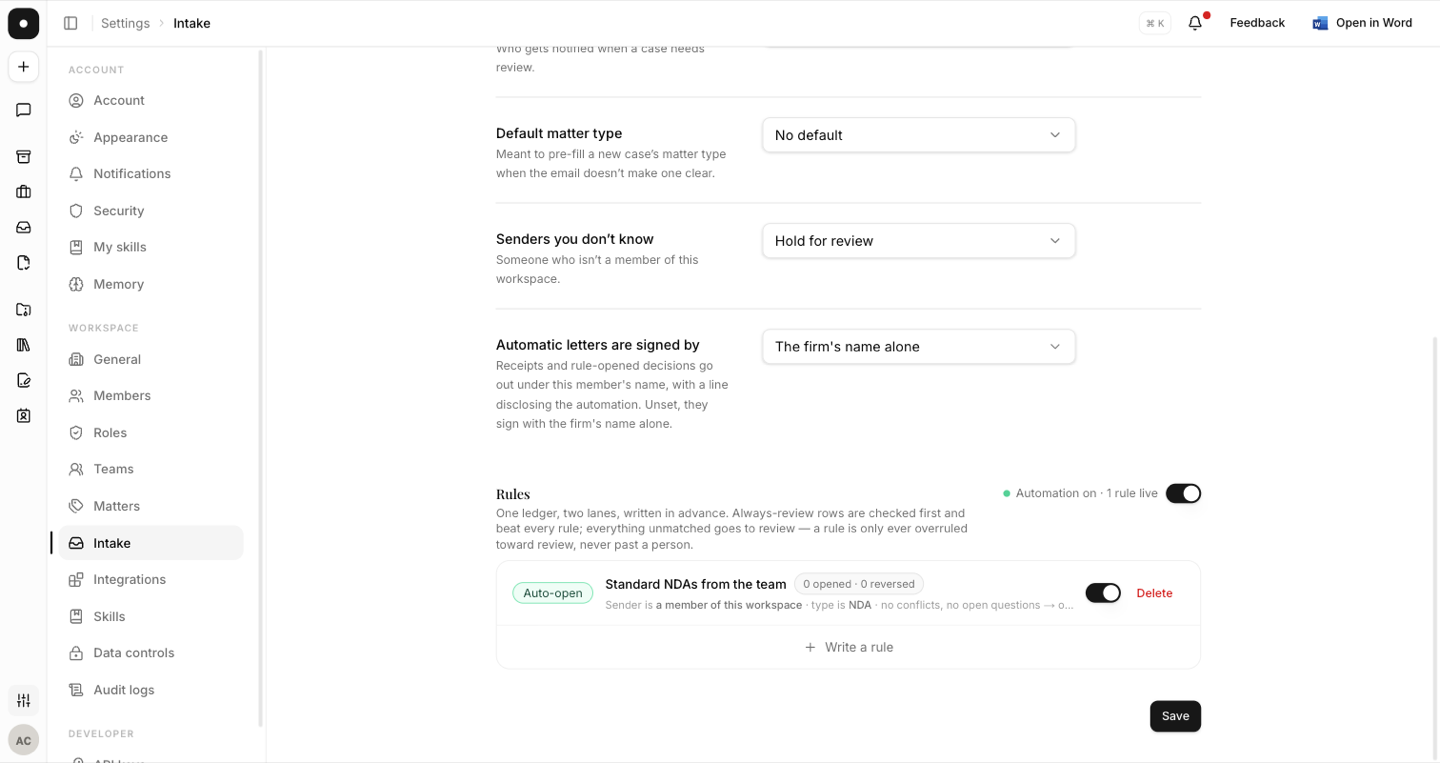
The rules page is a single ledger with two lanes:
- Always review — rows checked first, which beat every rule.
- Open automatically — rules that can open a matter without a person.
Everything unmatched goes to review. The design principle is stated on the page itself:
A rule is only ever overruled toward review, never past a person.
What a rule can say
A rule is deliberately narrow. Every rule must name a sender it trusts, and the vocabulary starts at exactly one option — a member of this workspace. In full, a rule reads:
Sender is a member of this workspace · type is NDA · no conflicts, no open questions → opens automatically, tells Commercial
So a rule names: the lane, the matter type, the team to notify, and a name for the rule itself ("Standard NDA, members").
A rule cannot open a matter for a sender outside your workspace, and cannot open one whose proposal has an unresolved conflict or an unanswered question. Those guards aren't configurable — they're the reason automation is safe to turn on.
Why a rule didn't fire
When a case that looked eligible waits for review anyway, the case's activity records the reason in plain language:
| Reason | What it means |
|---|---|
| Automation is paused | The workspace switch is off. |
| An always-review rule covers this matter type | The deny lane won. |
| No auto-open rule matches this matter type | Nothing was written for it. |
| It adds to an existing matter | Continuations are always a person's decision. |
| The proposal has an unresolved conflict | A guard held it. |
| A question to the requester is still unanswered | A guard held it. |
| The proposed matter type isn't in the workspace | Nothing invents a type automatically. |
| Not every sender is a workspace member | The trust condition failed. |
| The hourly auto-open limit was reached | A rate limit, not a refusal. |
The pause switch
One switch stands every rule down. Turned off, new work queues as ordinary review and nothing is lost — rules show as Standing down until it's turned back on. Individual rules can also be paused without deleting them.
Each rule carries its own record — "12 opened · 1 reversed" — so you can see whether a rule is earning its place.
Reversing a matter a rule opened
A matter opened by a rule is chipped Opened automatically, with a line saying a workspace rule opened it and no one approved it by hand. If it shouldn't have opened, "This shouldn't have opened" reverses it: the matter is archived and the case goes back into review.
Start with one rule, for your highest-volume type, and read its record after a fortnight. The reversal count tells you more than any amount of planning.