

Triage & assignment
Turn a pile of new requests into owned work — by person or by whole team.
Triage is the part that decides whether a queue helps or just accumulates. It's three decisions per request: how urgent is it, what kind of work is it, and who owns it. Done regularly it takes a few minutes; skipped for a week it becomes a backlog nobody wants to open.
By the end you'll know how to prioritise a request, assign it to a person or a team, and drive it to done.
This is for whoever runs intake — typically owners and managers, though what any role can change is configurable in Roles.
Open the request
Each request has its own page: an inline-editable title and description on the left, the comment-and-event timeline beneath it, and a triage sidebar on the right holding status, priority, matter type, assignees and due date.
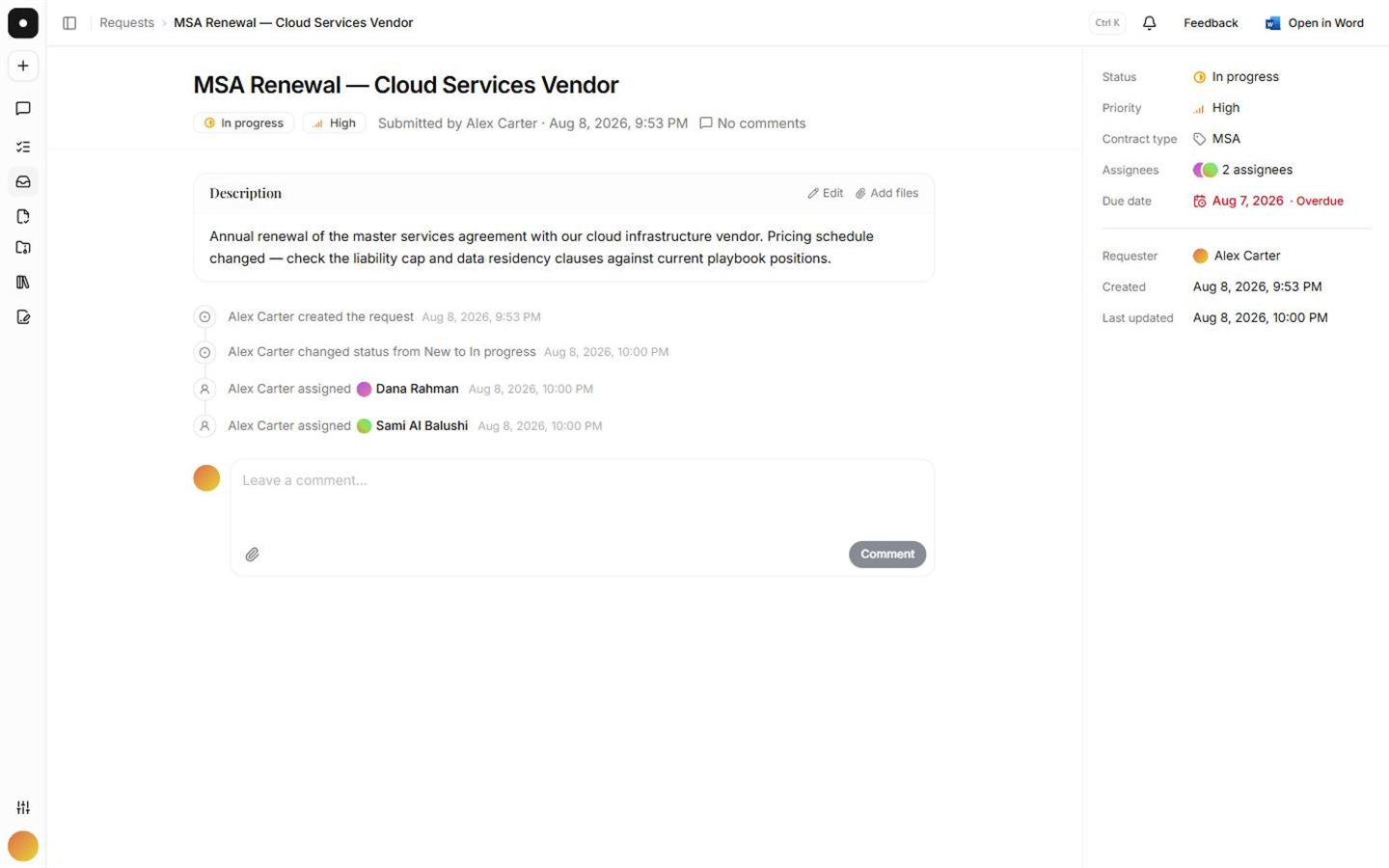
Assign a person, or a whole team
The assignee picker has two sections: Members and Teams.
Assigning a team is not a shortcut for picking its members one by one — it's a live link. A request's effective assignees are its direct assignees plus the current members of every assigned team, so someone who joins the Commercial team next month picks up the commercial requests automatically, and someone who leaves stops seeing them. Every member of a newly assigned team gets the same assignment notification an individual would.
Assign the team when the work belongs to a practice group, and a person when it belongs to a person. Teams survive holidays, departures and reorganisation; a name in a box doesn't.
Set priority and a due date
Priority (Low / Medium / High / Urgent) and the due date are what order everyone's Assigned to me queue. Overdue requests are highlighted on both the queue and the detail page.
Talk on the request, not around it
Comments live on the timeline, interleaved with the lifecycle events, so the reasoning and
the decisions stay together. Type @ to mention a member or a team — mentioning a team
notifies every member of it. You can edit and delete your own comments; an edited comment
is marked as such.
Notifications go out over both email and the in-app notification centre, and each person tunes them per channel under Settings → Notifications. The author is never notified of their own comment.
Attachments
Files can be attached to the request itself or to individual comments, the way a chat thread carries files per message — PDF, DOC and DOCX up to 20 MB. Request-level attach and remove are recorded on the timeline and in the workspace audit log; comment-level files follow the comment.
Drive it to done
Move the request New → In progress when someone picks it up, and Done when the work is finished. Use Closed for work that ended without being done — withdrawn, duplicated, or overtaken by events. Keeping those two apart is what makes the queue worth reading back.